Sakai 12 ReadMe
Assignments - Submission History field for Assignment Submissions has been removed in Sakai 12
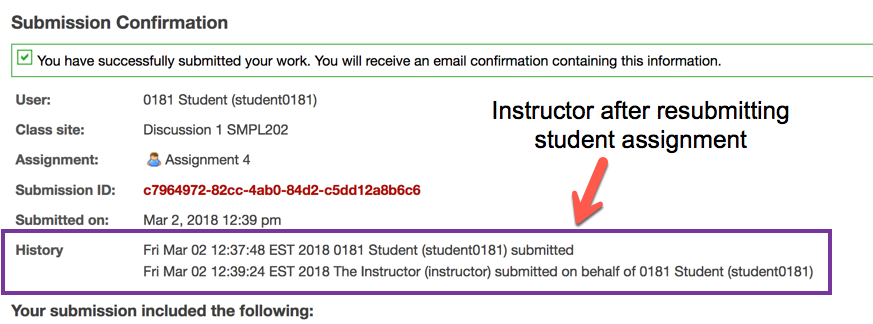
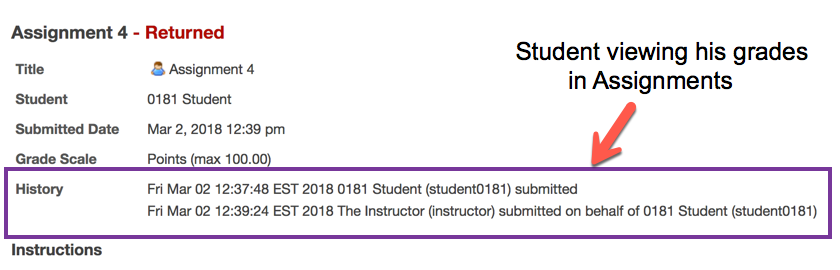
Sakai 11 shows a submission history for an assignment. This submission history in the user interface was removed as part of the Sakai 12 assignments tool refactor. A replacement is being explored at SAK-33701 - Getting issue details... STATUS
A screenshot showing the submission history in Sakai 11 for instructor view after re-submitting on behalf of the student. This field does not exist in Sakai 12.
A screenshot showing the submission history when the student is view his assignment grades. This field does not exist in Sakai 12.
Assignments - Site Archive is no longer compatible between Sakai 12 and earlier versions of Sakai
The Assignment XML that is exported in Sakai 12 is significantly different than in Sakai 11 and earlier. SAK-33845 - Getting issue details... STATUS
Assignments - For Attachment only assignments, student must upload a file. Links are not accepted.
The option "Select files from workspace or site" has been removed for Attachment only assignment types to prevent students from submitting a URL to a mutable document, like a Google doc, which potentially could be altered even after submission and due date have passed.
Bullhorn Notifications - A new feature which is off by default in 12
Bullhorn notifications is off by default in Sakai 12. It is for academic and social notifications. To be turned on by default in the future, some work may be needed to identify the desired behavior, which activities should generate notifications, which should not, and which potentially create double notifications, and then addressing those gaps to have desired default behavior. SAK-33724 - Getting issue details... STATUS
Course management SIS Load using CSV files
Jira:
SAK-33915 - Getting issue details... STATUS
Documentation:
MathJax - now a site level instead of a tool level setting
SAK-32421 - Getting issue details... STATUS
MySQL and MariaDB - upgrade to Hibernate resulted in new dialect
hibernate.dialect=org.hibernate.dialect.MySQL57InnoDBDialect
KNL-945 - Getting issue details... STATUS
Profile tool "wall" disabled by default in Sakai 12
SAK-32243 - Getting issue details... STATUS
Signup tool properties documented
The properties options have been updated in default.sakai.properties. No new properties have been added, just that existing properties have been documented.
Site Management - Duplicating sites disabled by default due to performance concerns
SAK-27908 - Getting issue details... STATUS
A JIRA is open, but not PR (pull request, aka source code contribution) for it yet. SAK-33400 - Getting issue details... STATUS
Syllabus - editing process has changed
Syllabus items can no longer be edited in place. Instead you must use the Bulk Edit UI. There is a request (Jira) to change the name of Bulk Edit to just "Edit" since this is the only option for editing a Syllabus item in Sakai 12. SAK-33328 - Getting issue details... STATUS and SAK-33769 - Getting issue details... STATUS
Test and Quizzes - Autosubmit in Samigo Tests and Quizzes always includes submission even if only partial
Doesn't affect when take highest score is in effect, but does impact average scoring of submissions or taking the score of the latest submission. There is a JIRA (not yet in 12) to update the text that is displayed to instructors and students, SAM-3359 - Getting issue details... STATUS . Related Jiras include SAM-2729 - Getting issue details... STATUS and SAM-3128 - Getting issue details... STATUS
Web Services
Please note that the default for webservices.log-allowed has been changed from true to false. KNL-1538 - Getting issue details... STATUS
----------------------------------
Sakai 12 properties
----------------------------------
Recommend storing files on your file system instead of database
Sakai will store the file content in the database as BLOBs by default. Set this value to change it to store the content on the filesystem instead.
The file system root for content hosting's external stored files (default is null, i.e. store them in the db).
# bodyPath@org.sakaiproject.content.api.ContentHostingService=/someplace/
# KNL-309 : To enable support for deleted files set this property to some location
# bodyPathDeleted@org.sakaiproject.content.api.ContentHostingService=${sakai.home}db/bodyContentDeleted/
# When storing content hosting's body bits in files, an optional set of folders just within the bodyPath -
# to act as volumes to distribute the files among - a comma separate list of folders. If left out, no volumes will be used.
# see the readme file (2.2.7 File Based Content Hosting) for more details
# bodyVolumes@org.sakaiproject.content.api.ContentHostingService=vol1,vol2,vol3
# Set to true to enable the release/retract and hiding of resources in ContentHostingService, Default: true
# availabilityChecksEnabled@org.sakaiproject.content.api.ContentHostingService=true
# Set to true to enable custom sorts within folders in ContentHostingService and the Resources tool
# DEFAULT: true
# prioritySortEnabled@org.sakaiproject.content.api.ContentHostingService=true
You might also want to enable the soft deletion feature of Sakai
Soft site deletion.
If enabled, sites that are deleted will be inaccessible to normal users but won't be deleted immediately, in case they need to be recovered.
You also need to set the gracetime value, in days. After this period, the softly deleted sites will be hard deleted. Defaults to 30 days.
There is a Quartz job that must be configured to run periodically (once per day or so) to expunge those sites.
site.soft.deletion=true (default is false)
site.soft.deletion.gracetime=30
Lessons - Changes to how Events are stored
Lessons management of HTML pages
By default, Lessons uses Content Security Policy headers to restrict what an HTML page can do, when the page is loaded from Sakai.
This is a security tradeoff. There are security risks from opening a web page written by someone else. That page can contain Javascript, which will execute with your own permissions. For this reason, by default Sakai will not open web pages in Resources. If you click on an HTML file there, it will download. We considered this inaccessible for Lessons, since the whole point of Lessons is to present content online. But we still had to deal with the security problem. So the page is served with an HTTP header that causes browsers to open the page in a “sandbox.” This restricts what the page can do.
This is new in 11. In Sakai 10, Lessons would simply open any HTML page specified.
You can restore the Sakai 10 behavior by adding the following to sakai.properties:
lessonbuilder.use-csp-headers=false
The recommended approach for dealing with this security risk is to use Sakai’s content domain support. This causes HTML pages stored in resources to be served from a different hostname than the main Sakai hostname. E.g. if your institution uses sakai.univ.edu, you might use content.sakai.univ.edu for content, resulting in URL such as https://content.sakai.univ.edu/access/content/group …. Using a separate domain prevents web pages from executing with your Sakai privileges. Thus if you are using a separate content domain, Lessons does not add the Content Security Policy headers.
Note that it is up to the browser to enforce Content Security Policy. Safari, Chrome, and Edge do. Firefox does not. Thus Firefox users are still at risk when opening HTML pages in Lessons. I believe IE 10 and 11 also support it.
Sakai skins using Morpheus
Documentation is stored with Sakai on Github
Sakai 11 changes the way sites are marked as "favorites"
Sakai 11 changes the way that sites marked as "favorites" are stored
in the database. If you are upgrading from an earlier version of
Sakai, you should run the "ConvertUserFavoriteSitesSakai11" script to
migrate your users' existing favorite sites to the new format.
You can run this script at any time following the upgrade to Sakai 11,
and Sakai does not need to be running for the script to work. If you
are planning an upgrade, a good time to run this is right before
starting Sakai 11 up for the first time.
The time required for the conversion will depend on how many users you
have in your system. As a rule of thumb, you can expect it to take
between 2-5 minutes per hundred thousand users.
To run the script, open a shell and run the following commands:
cd /path/to/your/tomcat-directory
Then, for Unix systems:
java -cp "lib/*" -Dtomcat.dir="$PWD" org.sakaiproject.user.util.ConvertUserFavoriteSitesSakai11
Or under Windows:
java -cp "lib\*" -Dtomcat.dir=%cd% org.sakaiproject.user.util.ConvertUserFavoriteSitesSakai11
Gradebook and SiteStats chart/statistics issue running under OpenJDK
There was an issue noted in SAK-40275 - Getting issue details... STATUS and SAK-40141 - Getting issue details... STATUS where Grade Statistics in Gradebook as well as Sitestats charts threw an error when running in OpenJDK. The solution that seems to works is to comment out the `assistive_technologies` line in `/etc/java-8-openjdk/accessibility.properties` or possibly to use Oracle JDK instead. I tried to install the libjfreechart-java (on Ubuntu) and restart but this didn't seem to fix it, but that could be an alternate fix. Since java is running headless on the server, removing assistive_technologies doesn't look like it does anything. This will not be an issue in Sakai 19 for Gradebook, but likely still be necessary for Sitestats to watch for.
Open and Awaiting Review Jira tickets
For listings of all open issues see:
These events were removed
These events were added